Introduction to CSS
HTML declares what elements are on the pages, CSS tells the browser how those elements should look.
How this works is that CSS associates style rules with various elements. Rules look like so:
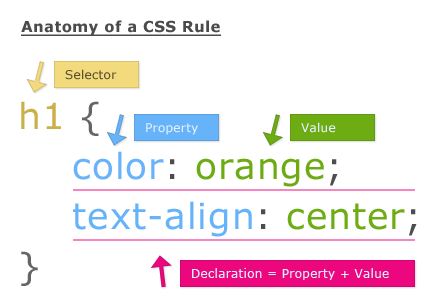
- The Selector is usually either an HTML element tag-name, class attribute value, or id attribute value.
- If a selector matches more than one element, all elements matched will receive the style rule.
- To select all elements of a given type, the selector must be the element's tag name with no brackets, e.g.,
aorp - To select all elements of a custom class attribute, prepend the class name with a
., e.g.,.red-textor.text-center - To select the hopefully one element of a given id, prepend the custom id with a
#, e.g.,#page-titleor#sidebar - You can even select elements relative to other elements. Check it out
-
Open Curly Brace
-
The Property is the quality of the element that will be changed. This always goes to the left of the colon.
- Example properties include: color, backgorund-color, font-size
-
The Value is the new value of the property to its left. Every property has it's own set of valid values. (For example, you can set font-size to 44px, but not to purple.)
-
Semi-colon
-
Repeat the property: value; syntax for as many rules as you'd like to apply to the selected elements.
-
Close Curly Brace
Location
CSS can go in an external file, but for now, let's write our CSS in the same file as our HTML.
The rules go within <style></style> tags, and the style tags go within the <head></head> tag. It'll look something like:
...
  <head>
    <meta charset="utf-8">
    <title>Awesome Site</title>

    <style>
      h1 {
        color: red;
      }

      .article {
        font-size: 14px;
      }

      /* more rules here */
    </style>

  </head>
...
Let's check out some properties!